
Beyond conventional drums.
Kicks, snares, claps and hi-hats sit alongside Karplus-Strong strings, modal resonators, GENDYN, VOSIM, bytebeat, nonlinear models and the new 3x3 engine.
Every engine is available on every channel.
Generative drum synthesizer · 0.9.0 preview

Ravik is a drum synthesizer built around eight independent channels. Each has its own synthesis engines, sequencer, tuning, modulation, filters and effects.
Build a conventional drum kit, or move into polyrhythms, tuned percussion, basslines and evolving textures. Every channel can follow a different rhythm, scale and direction.
VST3 · AU · Standalone · AUv3
macOS · Windows · iPhone · iPad
Desktop downloads are 0.2.1.
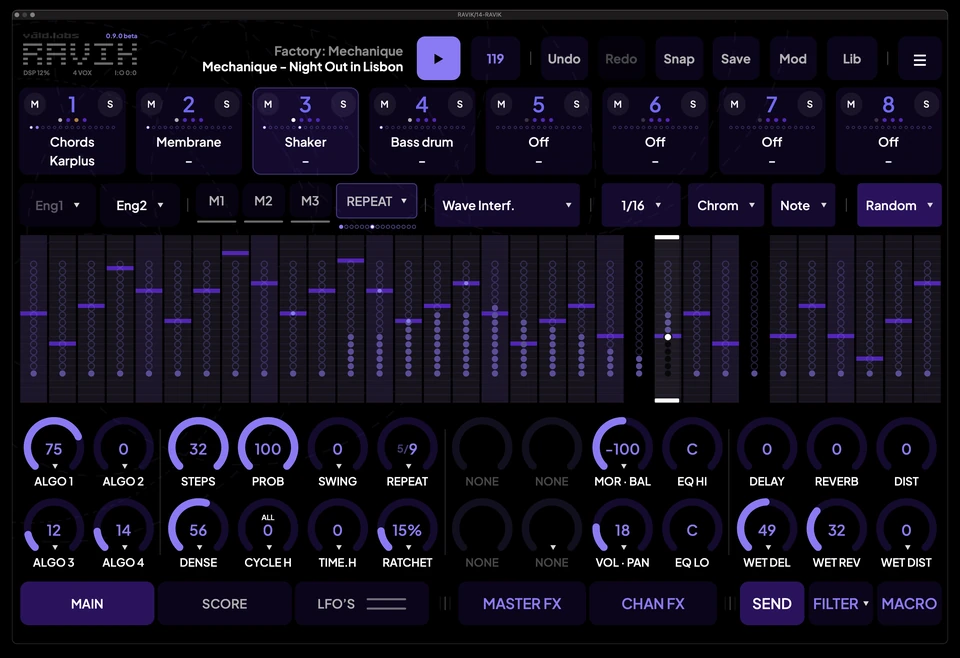
Ravik brings together 48 synthesis engines covering analogue-style drums, FM, physical modelling, resonators, particles, granular synthesis and more experimental sound generation.
Choose two engines for each channel. Balance different sounds or morph the parameters of matching engine types.
Both layers have independent sound controls and tuning, while sharing the channel's envelope, filter, EQ and effects.
Kicks, snares, claps and hi-hats sit alongside Karplus-Strong strings, modal resonators, GENDYN, VOSIM, bytebeat, nonlinear models and the new 3x3 engine.
Every engine is available on every channel.
Choose between Smooth, Voks and 3x3 filtering.
Use SNAP and Decay to control the transient and body, then shape the result with EQ, wavefolding, compression, ducking, stereo processing and effects.
Each channel has its own delay, reverb and distortion, with shared effects available across the kit.
Each channel has an independent 1-32 step sequencer with nine generative algorithms: wave interference, Euclidean, random walk, logistic map, cellular automata, clave, polyrhythm, breakbeat and golden ratio.
Control the number of steps, timing, direction, pitch range, scale, probability and density independently.
Add, remove and edit notes directly, or let the algorithms generate them.
Manual notes remain stored as you change Density. You can also protect them from being removed, keeping your own edits while continuing to explore different generated patterns.
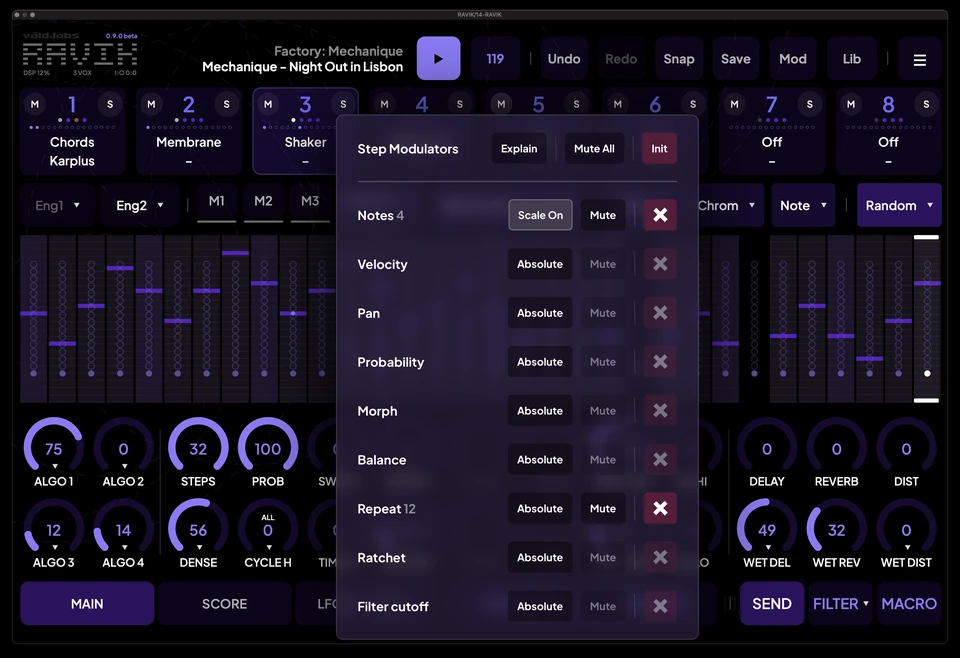
Edit individual steps across 32 destinations, including pitch, velocity, probability, synthesis controls, tuning, filters, dynamics and effects.
Set values directly, make relative adjustments where supported, or mute individual edits without deleting them.
Move patterns through time or pitch.
Horizontal Cycle shifts the sequence. Vertical Cycle moves notes through the selected scale or chromatically, with Wrap and Bounce options.
Auto Cycle repeats the transformation over successive pattern passes.
Step Mods can follow their notes or cycle independently, creating variations in sound without changing the underlying rhythm.
Repeat notes across successive steps or subdivide them with Ratchet. Both can operate simultaneously.
Set exact or randomized playback counts per note, with separate probability controls.
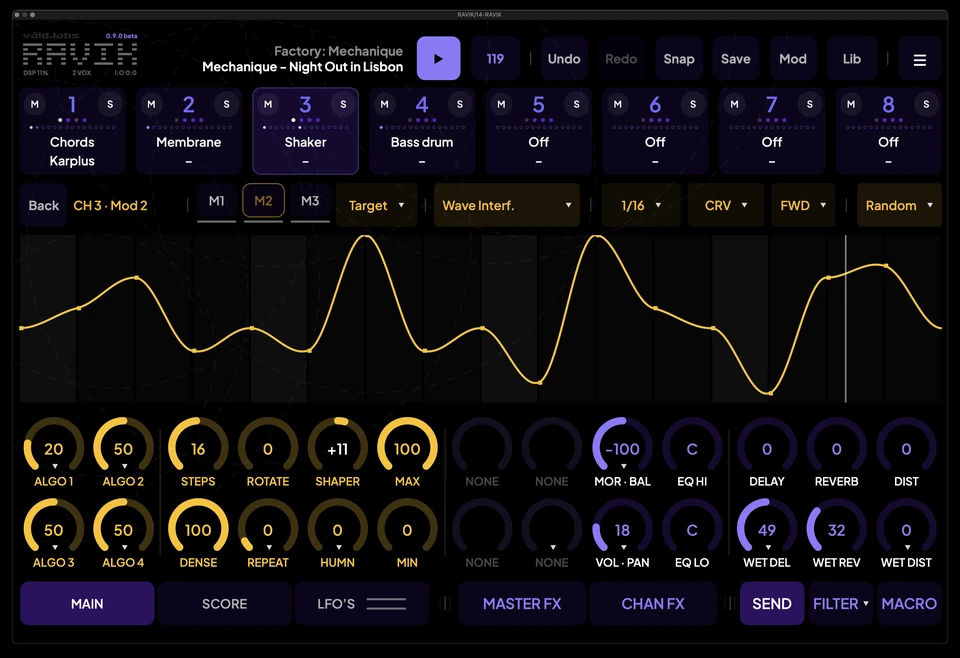
Each channel has three generative MOD lanes and two LFOs.
That's 24 MOD lanes and 16 LFOs across Ravik, with multiple destinations per source and cross-channel assignments.
Generate modulation curves or edit them manually, with up to 32 points and individual segment bends.
Rotate, reshape, repeat or humanize modulation independently of the note sequence.
LFOs support free-running, tempo-synchronized and audio-rate operation up to 20 kHz, with optional Note Follow.
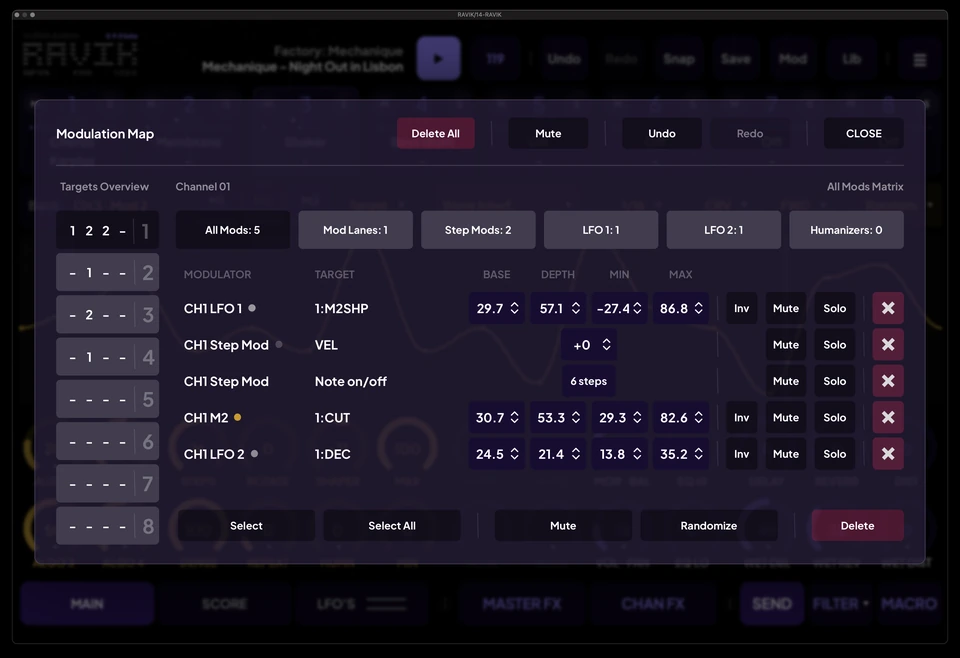
See how sources and destinations are connected.
Edit individual ranges, depth and direction. Mute, solo or remove connections, and audition assignments before saving them.
Six assignable macros let you control multiple parameters together.
Humanize doesn't stop at moving notes slightly ahead of or behind the beat.
Apply variation to individual sound parameters, including synthesis controls, tuning, filters, dynamics, pan and effects.
Amount determines how much a parameter varies.
Speed controls how quickly the variation moves.
Jitterness changes its character, from smooth movement to faster, more abrupt fluctuations.
Each destination can have its own settings.
Randomize an engine, a sequence, a modulation lane or the entire kit.
Use Range to limit randomization around the current settings. A small range introduces subtle variations; a larger range moves further from the original sound.
Choose which groups of parameters to affect, lock what you want to keep, and use Undo/Redo to revisit earlier results.
Ravik's library separates complete kits, channel patterns and individual sounds.
The complete eight-channel setup, including synthesis, sequencing, modulation and effects.
A channel's sound, sequence, modulation and manual step edits.
A channel's sound, independently of its sequence.
Load an Instrument onto an existing pattern without replacing the notes or modulation.
Use Try to audition Instruments before committing, or Split saved material into reusable Patterns and Instruments.
Organize everything into banks and folders, with separate import and export options.
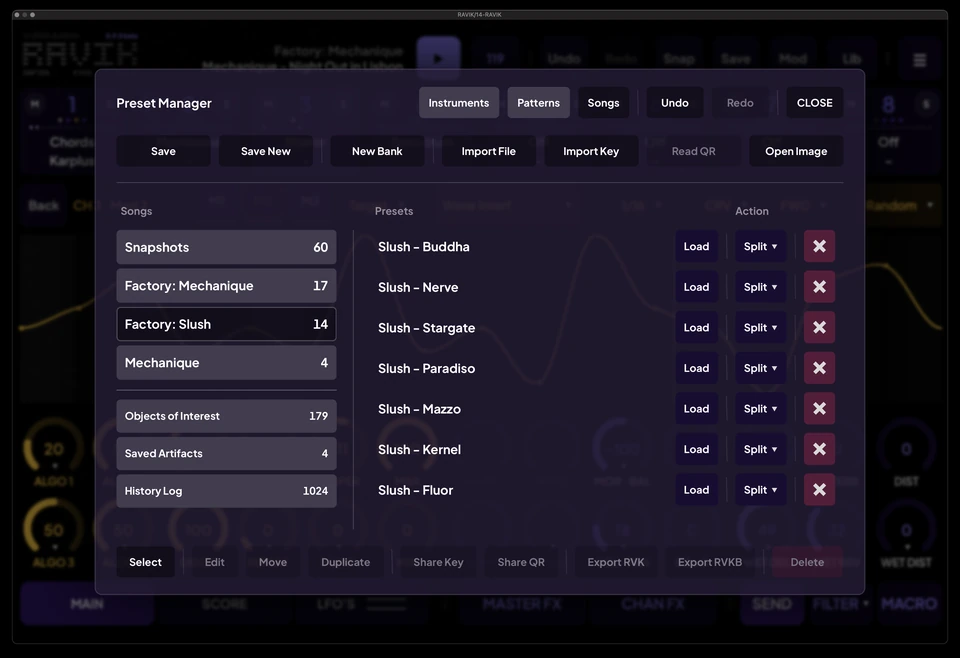
Some of the most interesting sounds happen while experimenting. Ravik includes three ways to return to them.
Save a checkpoint whenever you want.
Snapshots preserve the current configuration so you can return to it later.
Ravik automatically records completed edits, keeping a persistent history of previous working states.
Go back to an earlier configuration, even after closing and reopening the instrument.
Ravik automatically saves configurations you spend time playing or listening to.
Here's how it works:
When a pattern is playing, or you're playing Ravik through MIDI, an activity timer runs. After a sustained period of use, Ravik captures the current configuration.
The default is approximately 60 seconds. You can choose shorter or longer capture periods, or turn the feature off.
Changing an engine or a generation algorithm starts a new listening period. Ordinary sound adjustments can continue without interrupting it.
If you move on and later realize you preferred an earlier sound, open Objects of Interest to find it.
Each capture stores the complete kit, including sounds, patterns, modulation and effects. It's a saved configuration, not an audio recording.
Ravik keeps up to 1,024 recent Objects of Interest. Use Keep to move one into permanent Saved Artifacts, where it won't be removed as the automatic history fills up.
Nothing is captured simply because Ravik is open. The instrument must be actively playing.
Ravik includes a main stereo output and eight optional stereo channel outputs.
Process each channel independently, or use the shared effects and master processing to shape the complete kit.
Individual outputs can be taken after channel processing or through independent Post Master FX paths, including their own shared-effect returns.
Share complete Songs, individual Instruments or Patterns through portable files, compact keys and QR codes.
Import a saved QR image directly on desktop or iOS.
Presets and supported share keys from previous versions remain compatible.
Ravik 0.9.0 substantially expands synthesis, sequencing, modulation and preset management while retaining the existing workflow.
Please try the new engines and FM sound banks, Random Walk, channel copy/paste, Undo/Redo and patch sharing in your own sessions. We would also appreciate feedback on the new channel controls, note-activity flashes, automation, playback and multiple audio outputs in your DAW.
Send feedback to beta@valdlabs.com. For any issue, please include your operating system, DAW and plugin format, your patch, and the steps to reproduce it.
Thank you for helping us improve RAVIK.
Desktop public beta · 0.2.1
Create your own sounds, generate patterns, and take them wherever you want.
Apple Silicon & Intel · macOS 11 or later
64-bit Windows · x64
iPhone & iPad · TestFlight beta
Developed by Våld Labs in Lisbon.